How to screen resumes faster with AI (without lowering your bar)
Manual resume review is slow and inconsistent. Here's a practical workflow for using AI to screen resumes in bulk while keeping quality high.
By the Hyre Mate team
Quick answer
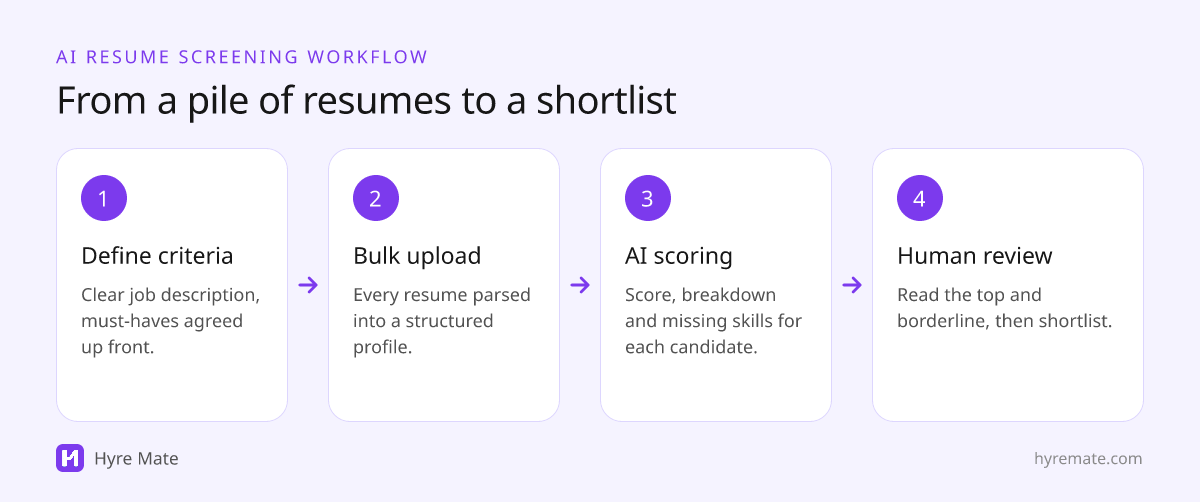
To screen resumes faster with AI, start from a clear job description with agreed must-haves, upload all the resumes in bulk, and let the AI parse each one into a structured profile and score it against the role. Then spend your own time where it matters: read the top-scoring and borderline candidates closely, check the evidence behind each score, and move the strongest to a phone screen. The AI does the reading; you make the decisions.
Key takeaways
- AI screening is only as good as the job description and criteria it scores against.
- Bulk upload and automatic parsing remove the slowest part: reading every resume end to end.
- Look at the score breakdown and missing skills, not just the overall number.
- Spend human time on the top and borderline candidates, and never auto-reject on a score alone.
- Check outcomes for bias regularly, because AI can repeat patterns from historical data.
If you've ever opened an inbox with 300 applications for one role, you know the problem: reading every resume properly takes hours you don't have, and by resume number fifty your standards have quietly drifted. AI resume screening fixes both issues, speed and consistency, when you use it well.
Why does manual resume screening break down?
Manual review has two failure modes. The first is time: thorough reading simply doesn't scale past a few dozen candidates. The second, more subtle, is inconsistency. The same resume can get a different verdict depending on when in the stack you read it, who reads it and what they read just before.
- Fatigue. The hundredth resume gets a fraction of the attention the fifth one did.
- Drift. One outstanding early applicant quietly raises the bar for everyone after them.
- Order effects. People who applied first, or whose resumes you read when you were fresh, get an advantage.
- Different reviewers, different standards. Two recruiters can disagree about the same resume because they're weighing different things.
Why don't keyword filters solve the problem?
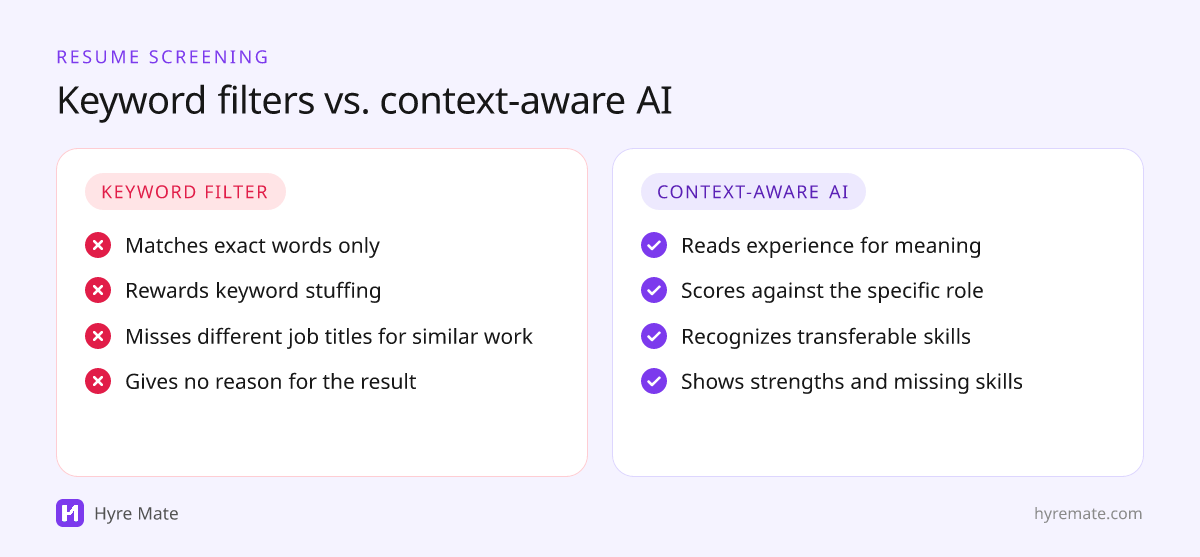
Keyword filters were the first attempt to automate screening, but they're blunt. They reward candidates who stuff the right words into their resume and penalize strong people who describe the same experience differently. They also can't tell you why a candidate is a good or poor match.
| Manual review | Keyword filter | AI screening | |
|---|---|---|---|
| Speed at volume | Slow | Fast | Fast |
| Consistency | Varies by reviewer and fatigue | Consistent but rigid | Consistent against the same criteria |
| Understands context | Yes | No: exact words only | Yes: reads for meaning |
| Explains the result | Only if the reviewer writes notes | No | Scores, strengths and gaps per candidate |
| Main risk | Fatigue and bias | Missing good candidates | Repeating bias; over-trusting scores |
What does context-aware AI screening actually mean?
Good AI screening reads for meaning, not keywords. It weighs relevant experience against the specific role you're hiring for, and it recognizes experience described in different words. For example:
- "Led a team of five engineers through a platform migration" is leadership and project ownership, even if the word "leadership" never appears.
- "Cut monthly churn by improving onboarding emails" is relevant to a customer success role, even without the phrase "customer retention".
- A "Support Engineer" and a "Technical Support Specialist" may have done very similar work under different titles.
- A teacher moving into training and enablement brings transferable skills that a keyword list would miss.
How do you screen resumes with AI, step by step?
- Write a clear job description first. The screening is only as good as the role it scores against. List must-haves separately from nice-to-haves. Our guide to writing better job descriptions covers how.
- Agree what matters with the hiring manager. Decide which requirements are true must-haves before any resumes come in, so the bar doesn't move later.
- Upload resumes in bulk rather than one at a time, so every applicant is processed the same way.
- Let the AI parse and score each resume into a structured profile against the role.
- Review the results in order. Read the strongest profiles first, then the borderline cases near your cut-off. Check the evidence behind each score.
- Shortlist and move fast. Invite the strongest candidates to a phone screen while they're still available, and tell everyone else promptly.
How do you read an AI resume score?
An overall score is a useful way to sort a pile, but the detail behind it is where the value is. In Hyre Mate, each resume analysis includes:
| Signal | What it tells you | What to check |
|---|---|---|
| Overall score (0 to 100) | How closely the resume matches the role overall | Use it to decide reading order, not to reject |
| Score breakdown | Separate scores for skills match, experience relevance, education match, technical skills and soft skills | Whether a high total hides a weak area that matters for this role |
| Matched and missing skills | Which of the role's skills appear in the resume, and which don't | Whether a missing skill is a true must-have or learnable |
| Strengths and areas for improvement | The specific reasons behind the score | That the reasons are job-related and accurate |
| Written feedback | A short summary of the candidate against the role | Read it against the resume itself |
Two candidates can share an overall score for very different reasons: one strong on technical skills but light on relevant experience, the other the reverse. The breakdown tells you which one fits this role.
How do you keep a human in the loop?
AI screening is decision support, not a decision-maker. Use the scores to prioritize and to apply a consistent first pass, then bring human judgment to the shortlist. In practice:
- Never auto-reject on a score alone. Read the resume before you rule anyone out, especially near the cut-off.
- Second-review the borderline. A quick look from a second person catches mistakes and keeps standards aligned.
- Record the reason for each decision in terms of the role's criteria.
- Treat surprises as signals. If a strong-looking resume scores low, check whether the job description is missing something, not just the candidate.
How do you keep AI resume screening fair?
AI can repeat patterns from the data it learned from. The best-known example is Amazon's experimental résumé-ranking tool, which it scrapped after finding the model penalized resumes associated with women; we cover it in our guide to AI in recruitment. To reduce the risk:
- Score against job-related criteria only, agreed before screening starts.
- Remove requirements that act as proxies, such as specific universities or unbroken employment history.
- Compare pass-through rates by group at the screening stage, using the four-fifths rule as a first check. Our shortlisting guide explains how.
- Tell candidates if AI is part of your screening process, and check the rules where you hire.
What should you do after screening?
Screening only saves time if the next steps are quick too. Once you have a shortlist:
- Book phone screens within a few days, using the same short script for every candidate.
- Send the people you're not progressing a short, prompt note, so nobody is left waiting.
- Keep the screening notes with each candidate, so the interviewers know why someone was shortlisted and what to probe.
- Review the criteria after the role closes. If the people you hired scored lower than people you rejected, your criteria or job description need adjusting.
How do you screen resumes with Hyre Mate?
Hyre Mate's AI resume screening is built around this workflow. You upload resumes individually or in bulk as PDF, DOC, DOCX, TXT, JPG or PNG files, with live progress while they're processed. Each resume is parsed into a candidate profile, and you can analyze candidates against any job to get the overall score, the five-part breakdown, matched and missing skills, strengths, areas for improvement and written feedback.
From there, candidates can move straight into interviews, where Hyre Mate generates questions for the role and turns interviews into notes and scores. The free plan includes 100 resume analyses a month, and Pro removes the limit.
Frequently asked questions
Can AI screen resumes accurately?
AI is good at reading consistently and spotting relevant experience described in different words, which makes it a strong first pass. It can still misread unusual resumes or reflect bias in its training, so a person should review the shortlist and the borderline cases.
Is it legal to use AI to screen resumes?
Generally yes, but some places regulate it. New York City requires bias audits and candidate notice for automated employment decision tools, and the EU AI Act treats recruitment AI as high-risk. Anti-discrimination law applies whether a person or software makes the call.
Should AI automatically reject candidates?
No. Use AI scores to decide what to read first and where to look closely. Rejecting candidates on a score alone risks missing good people and repeating bias, and it's restricted in some jurisdictions.
What resume formats can Hyre Mate analyze?
Hyre Mate accepts PDF, DOC, DOCX, TXT, JPG and PNG files, uploaded individually or in bulk.
How many resumes can I screen with Hyre Mate?
The free plan includes 100 resume analyses a month. The Pro plan includes unlimited resume analyses.
Does AI resume screening replace an applicant tracking system?
Not usually. An applicant tracking system manages postings and pipeline stages; AI screening focuses on reading and scoring resumes. Hyre Mate keeps candidates, jobs and interviews in one workspace, but it doesn't currently integrate with other applicant tracking systems.